
Resources
Make your next technology conversation more useful.
Start with a practical checklist or planning sheet. Gather what you know, mark what needs an answer, and use it to explain your priorities without having to diagnose the technology yourself. The new WOLFTRAXX SYSTEMS PDFs are downloadable and printable; the web versions include context and source links.
- For shop owners and service advisors
Walk through the front counter, service bays, printers, phones, and vendor dependencies. Open the shop technology checklist →
- For businesses comparing IT providers
Ask clear questions about scope, responsibilities, reporting, and handover before choosing a provider. Open the IT provider conversation guide →
- For a move, expansion, or equipment refresh
Build a brief around your workflows, dependencies, decision owners, and timing. Open the technology project checklist →

New: network and security decision aids.
- UniFi network planning sheet: Map Wi-Fi locations, wired devices, network separation, internet dependencies, and who owns the finished environment. Includes a two-page PDF.
- Small-business security readiness: Identify unanswered questions about accounts, devices, backup, and incident response without pretending a checklist is an audit. Includes a two-page PDF.
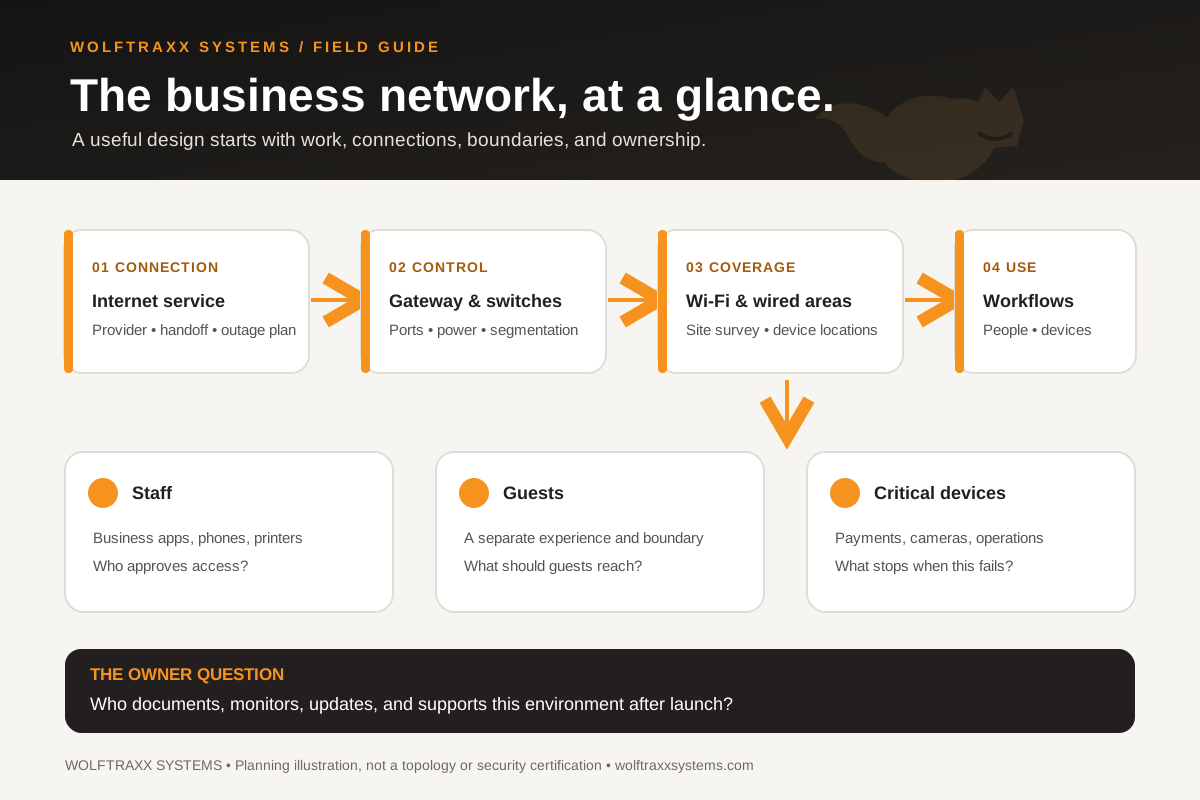
- Business network at a glance: Open an original infographic showing the decisions between internet, network, people, guests, and critical devices.
Support information for existing clients.
Existing clients should follow the support instructions agreed for their account. Use the preparation checklist to organize details for that channel. Read support information for the distinction between agreed support channels and public contacts. Public phone/email contacts are for general inquiries about support options, not support intake.
This website does not create a ticket or establish coverage, priority, availability, or response time. It does not provide emergency or time-sensitive monitoring.
Turn your notes into a conversation.
Browse our services to find the relevant area, or contact WOLFTRAXX SYSTEMS with your goal and the questions you would like to discuss. Keep passwords, payment information, and private customer records out of your initial message.